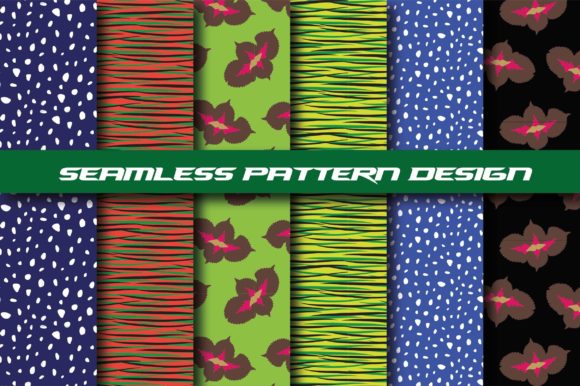
Seamless Digital Paper Patterns. Leaves
If you're designing fabric, creating wall decals, developing kids’ apparel, or crafting custom wrapping paper, Seamless Digital Paper Patterns. Leaves offers a practical, versatile starting point — not just as decoration, but as functional design infrastructure. These aren’t static clipart files or low-res JPEGs masquerading as patterns. They’re thoughtfully constructed, tileable vector illustrations built for real-world use: scalable without loss, editable in industry-standard software, and optimized for both print and digital output.
What People Often Misunderstand About Seamless Leaf Patterns
Many assume “seamless” means “ready to drop into any project.” In reality, true seamlessness depends on more than just invisible edges. It hinges on consistent scale, balanced density, harmonious color relationships, and intentional negative space — all of which affect how the pattern behaves across surfaces. A leaf pattern that looks elegant at 6 inches may overwhelm a baby onesie or vanish entirely on a large-scale wallpaper roll. Worse, some creators download files labeled “seamless” only to discover misaligned tiles, inconsistent stroke weights, or rasterized elements that pixelate when enlarged.
This leads to wasted time troubleshooting alignment in Illustrator, last-minute resizing that distorts leaf proportions, or discovering too late that the PNG version lacks transparency — making it unusable for layered textile mockups or branding assets.
Why File Format Mix-Ups Cost More Than Time
You’ll receive AI, EPS, 6 JPG (300 dpi), and 6 PNG (300 dpi) — but not all formats serve the same purpose. Using a JPG for fabric printing? You risk banding or compression artifacts in gradients. Relying solely on PNG for embroidery digitizing? You’ll hit roadblocks — vector paths are required for precise stitch mapping. And opening an EPS in newer versions of Affinity Designer or Figma without proper import settings can result in misplaced clipping masks or missing layers.
A better approach: Use the AI or EPS file as your master source for editing, scaling, or recoloring. Export JPGs only for client previews or web use where transparency isn’t needed. Reserve PNGs for quick integration into Canva, PowerPoint, or social templates — but always double-check the alpha channel is preserved before final upload.
Color & Scale Are Silent Decision-Makers
Leaf patterns come in many moods — botanical, minimalist, tropical, vintage, or abstract. But mood isn’t just about style; it’s about context. A dense, overlapping eucalyptus motif works beautifully on upholstery but may feel visually heavy on a delicate silk scarf. Likewise, a high-contrast black-and-white fern pattern reads boldly on packaging but can lack warmth in nursery textiles.
Before committing, ask yourself: Where will this live? Is it for quilting cotton (which absorbs ink differently than polyester)? For sublimation on sportswear (requiring RGB-safe palettes)? For a Shopify product mockup (needing clean, centered repeats)? The included six variations give flexibility — but they’re not interchangeable. One may be optimized for repeat spacing on 45" wide fabric rolls; another may suit 12" square scrapbook paper layouts better.
Common Oversights When Applying Leaf Patterns to Real Projects
- Ignoring bleed and trim zones: When printing fabric or wallpaper, patterns must extend beyond the cut line. If your leaf repeat doesn’t include at least 0.125" bleed, you risk white edges or misaligned seams — especially with rotary cutting or automated printers.
- Forgetting DPI context: “300 dpi” matters only when output size is fixed. A 300 dpi PNG at 1000×1000 pixels prints sharply at ~3.3×3.3 inches — but blurry at 12×12. Always calculate physical dimensions before sending to print.
- Overlooking licensing scope: These patterns are cleared for commercial use — including resale on physical goods — but not for reselling the files themselves or claiming authorship of the vector artwork. If you’re building a design subscription service or bundling assets for clients, verify permitted usage in the license summary.
How to Test a Seamless Leaf Pattern Before Full Deployment
Don’t wait until production day. Try this quick validation workflow:
- Tile it manually: Duplicate the pattern swatch twice horizontally and vertically in Illustrator. Zoom to 400% and trace along tile boundaries with the Pen tool — look for subtle shifts in leaf placement, stroke thickness, or shadow alignment.
- Convert to grayscale: Desaturate the image to check tonal balance. Uneven light/dark distribution often reveals unintentional visual weight — like too many dark stems clustering in one quadrant.
- Print a 2×2 inch swatch: On your target material (e.g., cotton duck, kraft paper, matte photo paper). Hold it at arm’s length. Does the rhythm feel calm or chaotic? Do leaves appear evenly spaced, or do gaps draw attention away from the motif itself?
When to Choose This Over Free Alternatives
Free seamless leaf patterns often sacrifice precision for convenience — inconsistent anchor points, embedded raster effects, or overly complex groups that slow down your software. With Seamless Digital Paper Patterns. Leaves, every vector path is simplified, every swatch is pre-tested for tile integrity, and each file includes organized layers (stems, leaves, background) so you can easily recolor or isolate elements.
That efficiency adds up: A freelance surface designer told us she cut her mockup turnaround time by nearly 40% after switching from scavenged freebies to curated, production-ready leaf repeats like these. For small batch apparel brands, that means faster sampling. For educators teaching pattern design, it means clearer demonstrations of repeat mechanics — no debugging corrupted files mid-class.
Final Checkpoints Before You Download or Deploy
Before adding Seamless Digital Paper Patterns. Leaves to your workflow, confirm:
- The AI/EPS file opens cleanly in your version of Adobe Illustrator or compatible vector editor (test with one file first).
- Your intended output medium supports the color mode used (CMYK for most fabric printing, RGB for digital displays).
- You’ve reviewed the license terms — especially if using for POD (print-on-demand), merch platforms, or client deliverables.
- You’ve soft-proofed at least one variation on your target substrate — screen, fabric swatch, or printed proof — not just in RGB preview mode.
Thoughtful pattern use isn’t about finding the “prettiest” leaf — it’s about matching structure to purpose. With Seamless Digital Paper Patterns. Leaves, you’re not just getting files. You’re getting tested, adaptable, professional-grade tools designed to integrate smoothly — whether you’re sketching your first textile collection or refreshing a decade-old brand identity.