Seamless Patterns with Violet Flowers
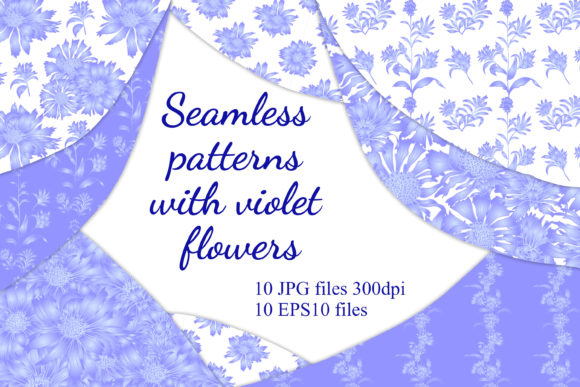
Seamless Patterns with Violet Flowers is a curated collection of 100 hand-drawn digital illustrations—each featuring delicate, stylized violet chicory flowers arranged into repeatable, tileable motifs. Designed from the ground up for real-world application, these patterns eliminate the guesswork of alignment and scaling while preserving artistic integrity. They’re not just decorative assets; they’re production-ready tools built to slot directly into creative workflows across industries—from textile development and packaging design to editorial layout and interior surface planning.
Where These Patterns Fit in Your Creative Process
Unlike generic stock graphics, Seamless Patterns with Violet Flowers are engineered for continuity and consistency. That means they support multiple phases of a project—not just the final output stage. Early on, they help establish visual tone during mood board creation or client presentation decks. During active design, they function as reliable base layers for fabric mockups, wallpaper prototypes, or branded product wraps. And post-production, they serve as scalable assets for print-on-demand services, merchandising extensions, or seasonal campaign refreshes—no reworking required.
For example, a small-batch apparel designer can use one pattern as the foundation for a summer dress line, then repurpose the same motif—adjusted for scale and contrast—as lining fabric, hang tags, and e-commerce banners. A stationery brand launching a botanical-themed planner set might apply the same violet chicory repeat across cover wraps, interior dividers, and even shipping labels—ensuring cohesion without duplicating effort.
Compatibility and Technical Readiness
All elements are delivered in two core formats: high-resolution raster (JPEG and PNG) and vector-based EPS10 files. This dual-format approach bridges flexibility with fidelity. The JPEG and PNG files are sized at 8334 × 8334 pixels—27.78 inches square at 300 DPI—making them suitable for large-scale printing like wall murals, fabric bolts, or exhibition backdrops. The EPS10 files retain full editability in Adobe Illustrator and other vector-compatible software, allowing designers to adjust colors, isolate individual blooms, or modify spacing without quality loss.
Because each file is saved at true 300 DPI and precisely aligned to seamless tiling logic, there’s no need for manual offset correction or edge-blending in Photoshop. You import, scale, and apply—whether you're working in Affinity Designer, Procreate (with compatible plugins), or industry-standard prepress environments. No additional plug-ins, scripts, or third-party tools are required to achieve clean, professional repeats.
Integration Into Real Workflows
For fabric designers, these patterns integrate cleanly into standard textile development pipelines. Upload the PNG or JPEG directly into CAD programs like Optitex or Browzwear for digital draping simulations. Use the EPS version to build colorways in Pantone libraries or generate weave/silk-screen separations. Because the violet chicory motifs are drawn with subtle variation—not rigid symmetry—they avoid the “machine-perfect” look that often undermines artisanal appeal, making them especially effective for premium home textiles or slow-fashion collections.
In packaging design, the scalability ensures legibility across formats: a single pattern can be reduced to a 2-inch label background or expanded to wrap an entire gift box. When paired with minimalist typography or foil-stamped accents, the violet florals add quiet sophistication without competing for attention. For scrapbookers and paper crafters, the high-res files allow crisp cutting on Cricut or Silhouette machines—even when nesting intricate die-cut shapes within floral clusters.
Educators and content creators also find practical utility here. A biology teacher illustrating plant morphology can use isolated violet chicory elements (extracted from the EPS files) to annotate diagrams. Bloggers covering sustainable living or garden-to-table themes incorporate the patterns into newsletter headers or printable garden journal templates—reinforcing thematic continuity across digital touchpoints.
Preparation and Organization Tips
Before importing into your project, organize files by use case. Create dedicated folders labeled “Fabric,” “Packaging,” “Wallpaper,” and “Digital Assets.” Within each, store both the JPEG (for quick preview and raster-based edits) and EPS (for color adjustments and layout precision). Name files descriptively—e.g., “VioletChicory_SoftRepeat_Fabric_v2” rather than “Pattern_07”—to reduce search time during tight deadlines.
When preparing for print, always verify bleed and trim settings in your layout software. Although the patterns are seamless, some printers require a 0.125-inch bleed extension—simply duplicate and offset the tile slightly beyond the artboard edges using your DTP tool’s transform functions. For web use, export lightweight WebP versions from the original PNGs, preserving transparency where needed for overlays or responsive backgrounds.
Quality Control and Long-Term Use
Each of the 100 illustrations was reviewed for repeat integrity, color balance, and stylistic consistency. There are no duplicated motifs or accidental pixel misalignments—critical for maintaining trust in repeat-based applications like wallpaper or upholstery. Over time, this consistency pays off: updating a brand’s visual language becomes faster when core pattern assets remain stable across years of iterations.
To extend longevity, avoid embedding raster files directly into layered PSDs or InDesign documents unless necessary. Instead, link them externally—this keeps file sizes manageable and allows global updates if you later refine a color palette or add new variants. Store master EPS files in cloud-synced folders with version history enabled, so earlier iterations remain accessible if a client requests a specific historical colorway.
Getting Started After Purchase
Once payment clears, download links appear instantly via email and your account dashboard. Files are grouped into clearly labeled ZIP archives—“Raster_Files” contains the 10 JPEG and 10 PNG assets; “Vector_Files” includes the 10 EPS10 files. All are named sequentially but meaningfully, with embedded metadata describing flower density, scale ratio, and dominant hue temperature (cool violet, soft lavender, muted plum).
If a download fails or a file appears corrupted, contact support directly—no automated forms or ticket queues. A response arrives within business hours, and replacements are sent manually with confirmation. This isn’t just customer service; it’s workflow continuity assurance. Because delays in asset access can stall production timelines, especially for time-bound launches or seasonal inventory cycles, prompt resolution is built into the delivery model—not added as an afterthought.
Why This Collection Stands Apart
Many floral pattern sets prioritize quantity over cohesion—or rely heavily on AI-generated sameness. Seamless Patterns with Violet Flowers avoids both pitfalls. Each illustration is hand-drawn, then digitally refined to ensure organic flow and intentional negative space. The violet chicory flower was chosen not only for its elegant silhouette but also for its versatility: its slender stems and open-faced blooms translate equally well to linen textures, matte paper stocks, and glossy packaging finishes.
More importantly, the collection assumes you already know your tools and your goals. It doesn’t ask you to learn new software or adapt to arbitrary constraints. It meets you where you are—in Illustrator, Photoshop, Canva, or even physical screen-printing studios—and delivers exactly what’s needed to move forward: clarity, control, and craft.